




Bangkok Airways Round Up
- The Thailand Digital Arrival Card (TDAC) is an online entry form for foreign travelers, replacing the paper TM6 form from 1 May 2025. All non-Thai nationals, including children and infants, must register for the TDAC before entering Thailand by air, land, or sea. Transit passengers who do not pass through immigration, Border Pass holders, and airline operating crew are exempt.
- Travelers must register for the TDAC within three days before arriving in Thailand. Keep your confirmation email and QR code ready to show immigration officers on your phone or another electronic device. Download or save a screenshot in advance and keep it throughout your stay. A new TDAC is required for every entry into Thailand.
Planning a trip to Thailand? Complete the Thailand Digital Arrival Card (TDAC) before traveling to Thailand. Bangkok Airways’ complete 2026 guide covers the latest requirements, step-by-step registration instructions, and everything you need to know before entering the country.
What is the Thailand Digital Arrival Card (TDAC)?
The Thailand Digital Arrival Card, or TDAC, is an electronic arrival registration system for foreign travelers. Officially introduced on 1 May 2025, it replaces the former paper-based TM6 immigration form.
Before entering Thailand, travelers must submit key information, including passport details, travel plans, accommodation in Thailand, and relevant health information. The data is submitted to the Immigration Bureau to support arrival screening and immigration procedures.
The TDAC is designed to:
- Reduce paperwork: Online registration replaces paper forms, making information easier to submit and manage.
- Speed up immigration procedures: Submitting your information in advance helps make the immigration process faster and smoother upon arrival.
- Strengthen border security: Digital records support more effective screening and management of international arrivals.
Who Needs to Register for the Thailand Digital Arrival Card (TDAC)?

All non-Thai nationals must complete the TDAC before entering Thailand by air, land, or sea. This includes:
- Tourists: Travelers visiting Thailand for holidays, sightseeing, or to visit family and friends.
- Business travelers: Those entering the country for meetings, business activities, work, or professional events.
- Foreign residents of Thailand: Long-term visa holders and residents returning to Thailand after traveling abroad.
The requirement applies to travelers of all ages, including children and infants. A separate TDAC must be submitted for each person.
Who Is Exempt from Thailand Digital Arrival Card (TDAC) Registration?
- Transit or transfer passengers: Travelers continuing to another country without passing through Thai immigration or leaving the international transit area.
- Border Pass holders: Eligible nationals of neighboring countries entering and leaving designated border areas under relevant agreements.
- Operating crew members: Airline, vessel, or international transport crew members entering Thailand as part of their official duties.
Step-by-Step Registration Guide for the Thailand Digital Arrival Card (TDAC)
The TDAC system is designed for quick and easy online registration at no cost. Travelers may submit their information within three days before arriving in Thailand.
Step 1: Visit the Official TDAC Website
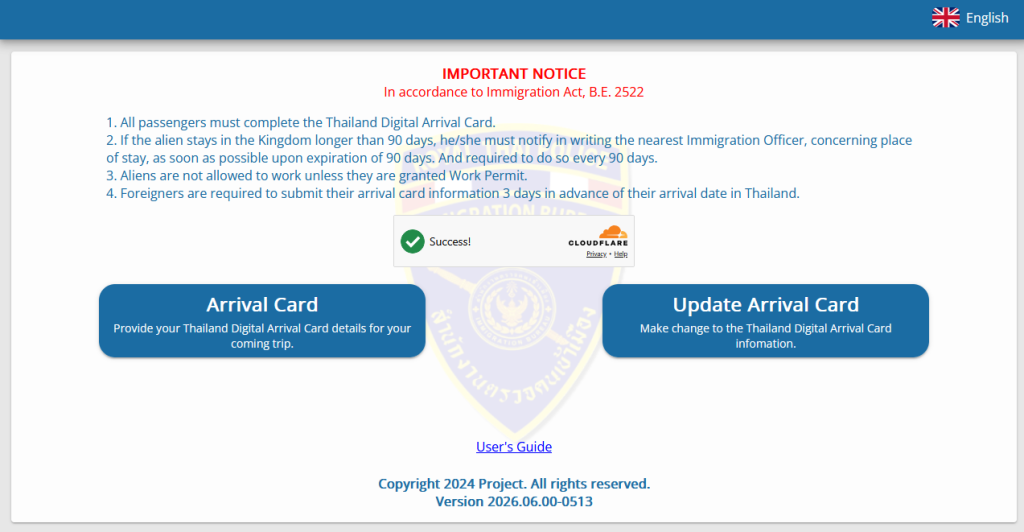
Go to the official TDAC website operated by the Thai Immigration Bureau at https://tdac.immigration.go.th/ and select “Arrival Card.” Then choose one of the following registration options:
- Individual Submission: For a single traveler.
- Group Submission: For groups of up to 10 travelers per application.
Step 2: Fill in Your Personal and Passport Information
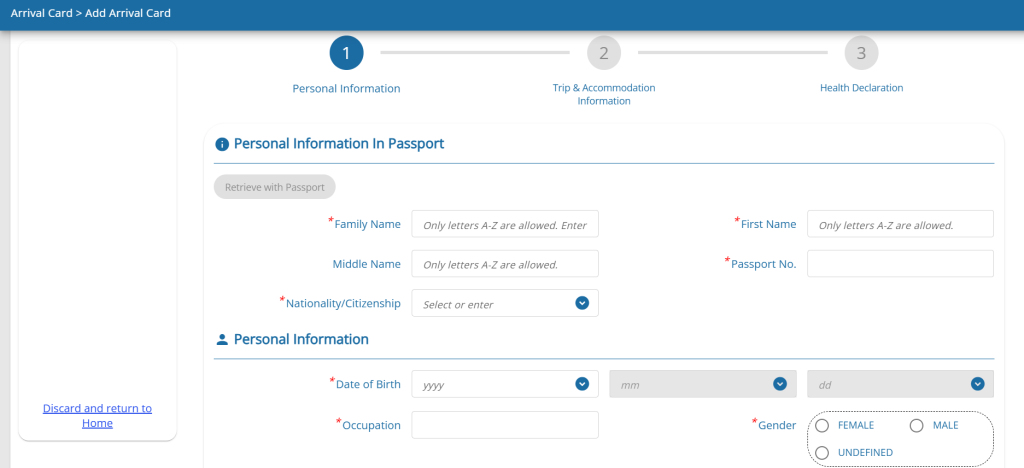
Enter your personal details in English exactly as shown in your passport, including:
- Full name
- Date of birth
- Nationality and gender
- Occupation
- Country of residence
- Phone number
- Passport number
Tip: You can scan or upload an image of the Machine-Readable Zone (MRZ) at the bottom of your passport’s information page. The system will automatically extract and fill in the details. Always double-check your name, passport number, and all other information before continuing.
Step 3: Provide Your Travel Method and Accommodation Details
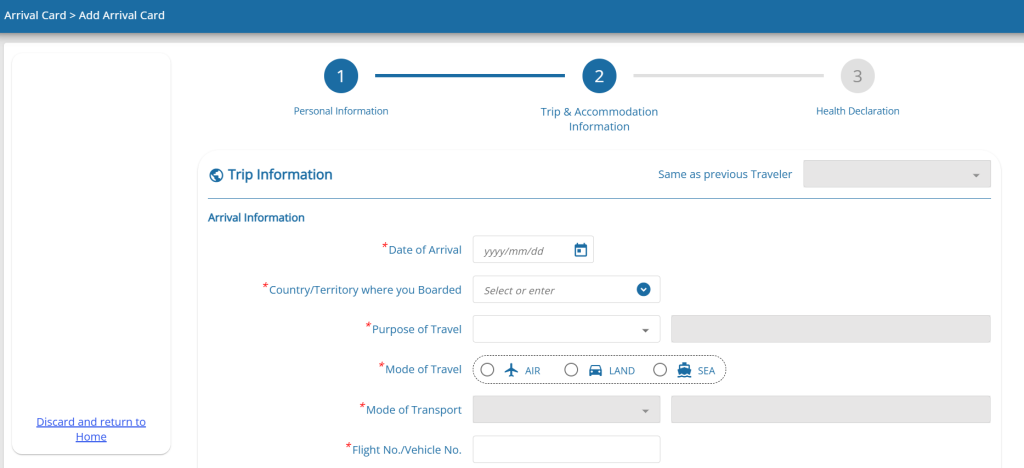
3.1 Provide the details of your journey to Thailand, including:
- Date of Arrival
- Country or territory of departure
- Mode of travel: air, land, or sea
- Flight or vehicle number
- Purpose of travel
- Departure details from Thailand, if applicable
3.2 Enter your accommodation details in Thailand, such as the name and address of your hotel, residence, condominium, or the home of a friend or relative.
- Type of Accommodation in Thailand
- Province
- District, Area
- Sub-District, Sub-Area
- Post Code
- Address
Tip: Prepare the property name, province, district, and full address before starting your registration.
Step 4: Complete the Health Declaration Form
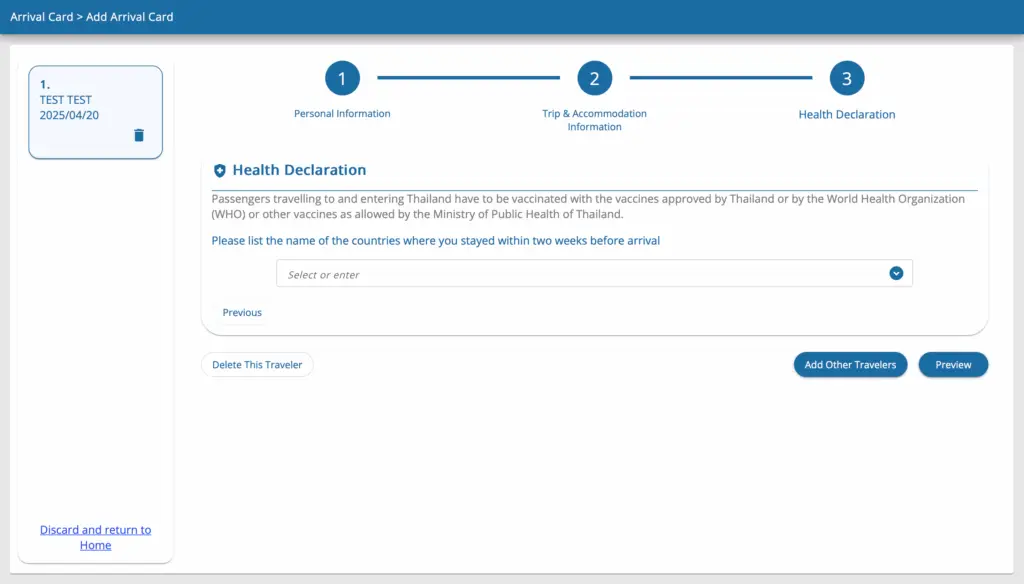
List any countries or territories where you have stayed or traveled during the 14 days before arriving in Thailand.
Note: If your country of departure, travel history, nationality, or flight is included on the list specified by Thailand’s Ministry of Public Health, additional fields will appear automatically. You may also be asked to provide information or proof of yellow fever vaccination, depending on the applicable requirements.
Step 5: Submit the Application and Save Your Confirmation
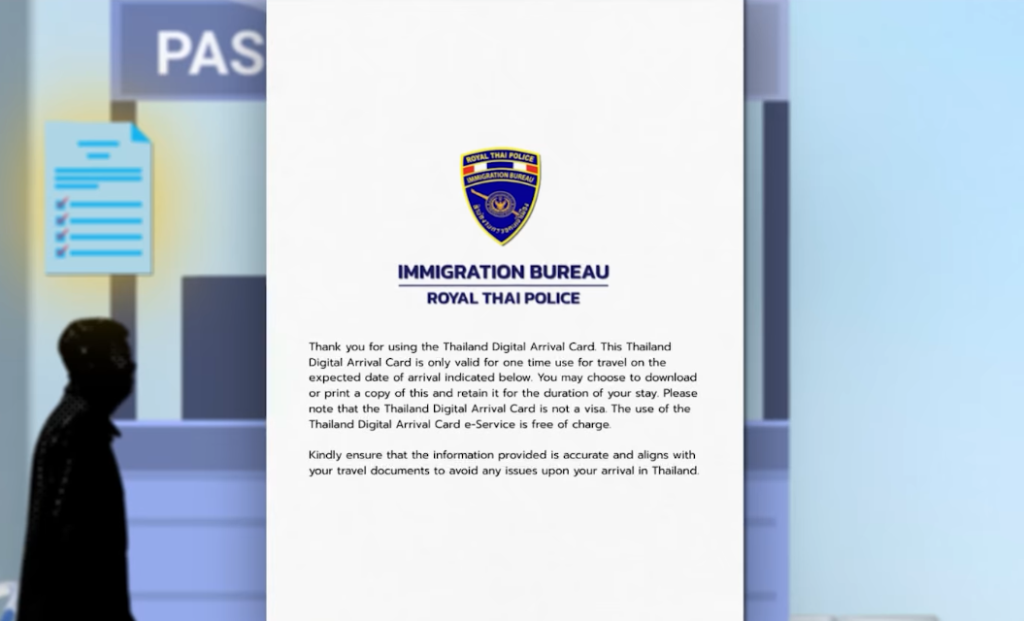
5.1 Review all information on the summary page carefully. If you find an error, select “Edit” to return and make changes. Then enter the email address where you wish to receive your TDAC, accept the terms and conditions, and select “Submit.”
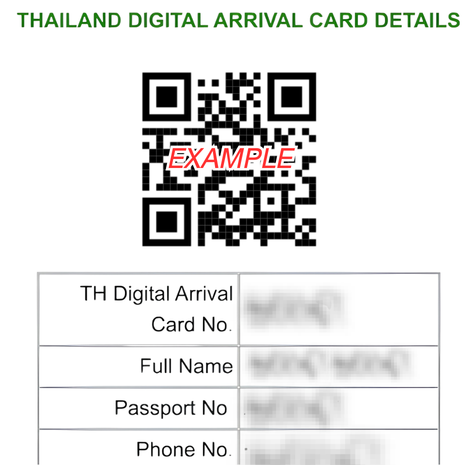
5.2 Once submitted, you can download your TDAC document with its unique QR code. A copy will also be sent to your registered email address. Save the document or QR code on your phone to present it to immigration officers upon arrival.
Note: A printed copy of the TDAC document is not required, although you may carry one as a backup.
Important Things to Know Before Registering for the Thailand Digital Arrival Card (TDAC)

- All information on the TDAC form must be entered in English. Check every detail carefully, especially the information automatically extracted from your passport’s MRZ.
- If your travel plans or accommodation details change, select “Update Arrival Card” to revise the information before entering Thailand.
- The system does not allow changes to your passport name, nationality, passport number, or date of birth. If any of these details are incorrect, submit a new TDAC registration. The system will use the information from your most recent submission.
Navigating Immigration at Major Thai Airports with Your Digital Card
1. Presenting Your TDAC at the Immigration Checkpoint
Upon arrival in Thailand, keep your TDAC confirmation email and QR code ready to present to immigration officers. You can display the QR code on your phone, tablet, or other electronic device, so a printed copy is not required.
Tip: Download the TDAC document or save a screenshot of the QR code in advance so you can access it without an internet connection. You may also carry a printed copy as a backup if you prefer not to use an electronic device.
2. Important Reminder to Keep Your TDAC Confirmation for Departure
After clearing immigration, keep your confirmation email, TDAC document, or QR code on your phone throughout your stay. Do not delete any of them until you have departed Thailand, as you may need them for reference or be asked to present them to an officer during your trip.
Q&A About the Thailand Digital Arrival Card (TDAC)
How far in advance can I apply for the Thailand Digital Arrival Card?
You can apply for the Thailand Digital Arrival Card within 3 days (72 hours) before arriving in Thailand. For example, if you arrive on July 30, 2026, you can register between July 27 and July 30, 2026. It is recommended to complete the registration before your trip to avoid delays.
Do I Need to Fill Out the Thailand Digital Arrival Card (TDAC) Form Every Time I Enter Thailand?
Yes. You must submit a new TDAC form every time you enter Thailand, as each registration is valid for one arrival only. Frequent travelers can copy details from a previously completed TDAC, update the travel dates, flight information, and any other relevant details, then submit a new application without entering all the information again.
Can I Still Use the Traditional Paper TM6 Form?
No. The traditional paper TM6 form has been replaced by the Thailand Digital Arrival Card (TDAC) since 1 May 2025. Eligible foreign travelers must complete the TDAC online before entering Thailand.
Can I Edit My Thailand Digital Arrival Card (TDAC) Information After It Has Been Submitted?
Yes. You can update certain information, including your travel and accommodation details, by selecting the “Update Arrival Card” option on the website before entering Thailand. However, you cannot change your full name, nationality, or date of birth. If any of these details are incorrect, you must submit a new TDAC form.
Is There a Fee to Register for the Thailand Digital Arrival Card?
No. There is no fee to register for the Thailand Digital Arrival Card through the official immigration website: https://tdac.immigration.go.th/. Please be aware of scam websites or third-party services that ask for payment. Always use the official website.
Complete Your Travel Preparations with TDAC and Fly with Bangkok Airways.

Book your flight to Thailand with Bangkok Airways, then complete the Thailand Digital Arrival Card (TDAC). Enjoy a seamless full-service experience, including seat selection, a 20 kg checked baggage allowance, in-flight meals, and access to premium lounges.
Bangkok Airways: Experience Unparalleled Comfort and Convenience.
Embark on seamless travel adventures with Bangkok Airways’ extensive network of flights connecting you to Singapore, Laos, Cambodia, and Hong Kong. Additionally, enjoy our domestic flights to Chiang Mai, Bangkok, Koh Samui, Sukhothai, and Trat.
- Seat Selection: Choose your preferred seat on your flight to ensure a comfortable journey.
- Baggage Allowance Included: Enjoy up to 20 kg of checked baggage, allowing you to bring along your essentials without worry.
- In-flight Meals: Savor delicious and satisfying meals on board, tailored to your taste preferences.
- Airport Lounge Access: Relax and unwind in our exclusive airport lounges before your flight.